




I read a project board far more often than I edit one. What is on the board is something I want to know while I am standing in the checkout, working — not after opening a browser, finding the organisation, clicking the right board and hunting down the card.
So: gitpro, version 1.0.0, now on Hex.
cd ~/Projects/some-repo
gitpro
That is the whole invocation. gitpro asks git which repository the working directory belongs to, asks GitHub which Projects v2 boards that repository is linked to, and opens the cards on one of them.
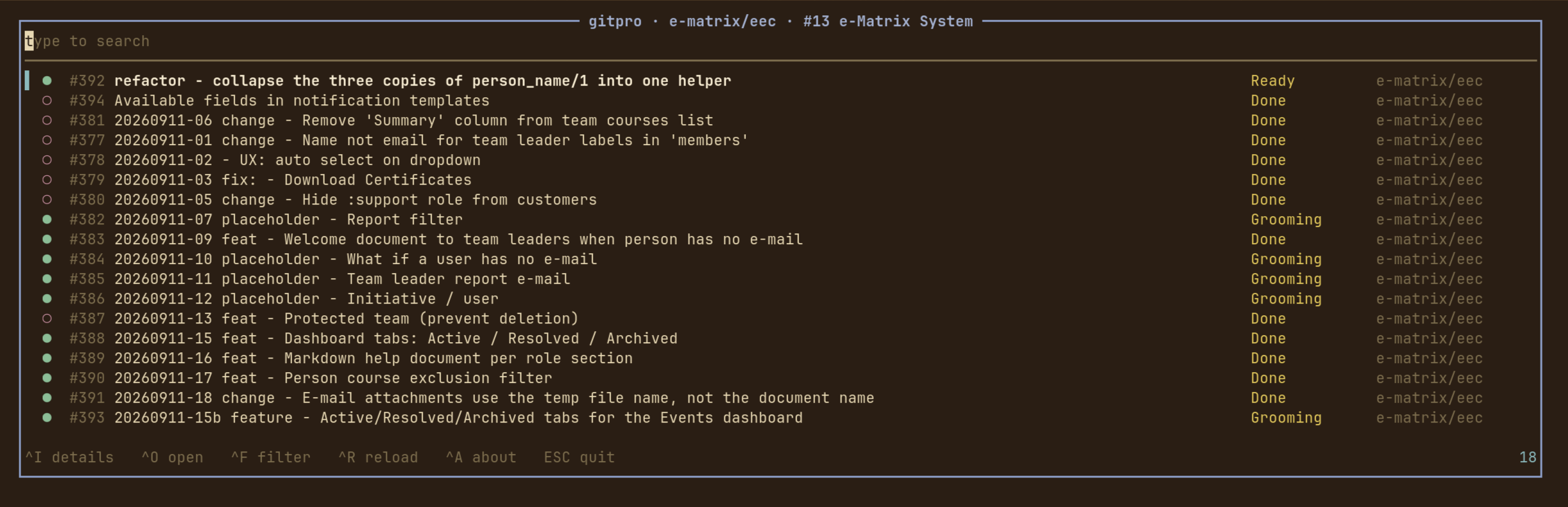
Typing is searching
There is no mode to enter and no key to press first. The search field has the keyboard from the moment gitpro opens — every printable character is the query’s, and everything else is bound to a key the field does not want. Every word has to match somewhere in the row: its number, title, repository, column, author, milestone, labels, assignees or state.
^F opens the switches: state (open, closed, merged, draft — only the
ones the board actually has), the board’s kanban columns, the labels the cards
wear and the people they are assigned to, each with an empty bucket of its own.
The list narrows behind the popup as the switches are set, so you can see what a
switch does before you commit to it.
^I shows a card in full — title, description, state, column, repository,
author, labels, assignees, milestone and dates. All of it arrived with the
board, so the popup opens instantly and keeps working with the network gone.
j and k walk to the next card without closing it: reading through a column
is opening the first card and holding j. ^O or Enter opens the card in a
browser.
How it is put together
The UI is Atui, a terminal toolkit in the
shape of Phoenix LiveView: views with state, a render/2 that returns cells,
and a runtime that owns the terminal.
It talks to GitHub through the gh CLI, which means
there is no HTTP client, no JSON dependency and no token to configure beyond
gh auth login.
Two things are deliberate. Failing happens in the terminal, not in the UI — “not a git repository”, “gh is not installed”, “this repository is not on a project board” are printed on stderr, with a non-zero exit status, before the alternate screen is opened. And everything that decides what is on screen is a pure function over data: the filters, the GraphQL decoders, the row widths, the window onto a list longer than the screen. So the interesting half of the application is tested without a terminal and without a token.
Installing
gh has to be installed and logged in with the project scope:
gh auth login
gh auth refresh -s project      # if 'project' is not already in gh auth status
Then, in one step:
mix escript.install hex gitpro
The escript lands in ~/.mix/escripts, so that wants to be on your PATH.
Not yet
An MVP, and it shows. Next up: comments and sub-issues in the detail popup, moving a card between columns from here rather than in a browser, and remembering the switches per board between runs.
- Hex: https://hex.pm/packages/gitpro
- GitHub: https://github.com/iboard/gitpro
- Docs: https://hexdocs.pm/gitpro
GPL-3.0-or-later.